How to Choose the Best DPI for Your Mouse
Choosing the best DPI for your mouse does not mean selecting one universal number. DPI determines how far the cursor moves when you physically move the mouse.
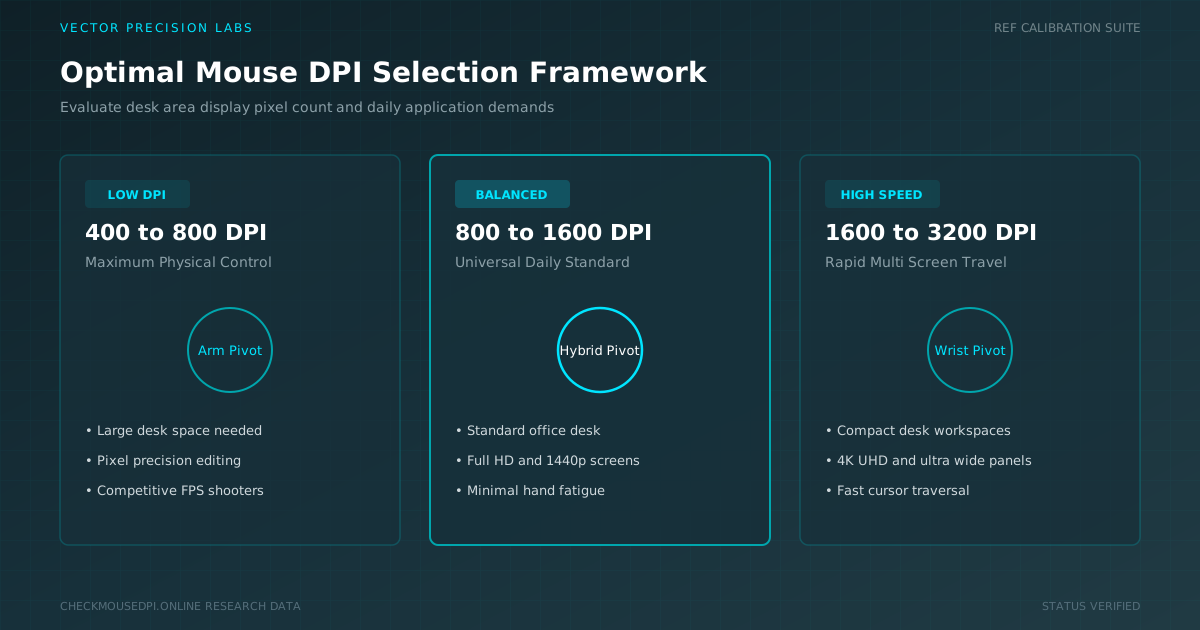
Choosing the best DPI for your mouse does not mean selecting one universal number. DPI determines how far the cursor moves when you physically move the mouse. A higher DPI makes the pointer move farther with less hand movement, while a lower DPI requires more physical movement and provides greater control.
The ideal mouse DPI depends on your mouse, workspace, monitor, daily tasks, and personal preferences. A setting that feels comfortable for one person may feel too fast or too slow for another. The best DPI should feel natural, predictable, and easy to control.
Look at Your Mouse Design
Your mouse design can influence which DPI feels comfortable. The shape, size, weight, and sensor can affect how easily you control the pointer. Lightweight mice may feel comfortable at slower settings, while gaming mice can work well across a wider range of DPI values.
Your grip style also matters. A palm grip usually involves broader movements, while a fingertip grip allows smaller and quicker movements. Consider how naturally you move the mouse before changing your DPI.
Start With a Practical DPI
You do not need to choose the lowest or highest DPI supported by your mouse. Start with a practical setting and adjust it according to your needs.
Moderate DPI is often suitable for everyday activities such as browsing, reading documents, and managing files. Lower settings can help with detailed work, while higher settings may be useful when you have limited desk space.
These are only starting points. Your ideal setting depends on your equipment, habits, and comfort.
Match DPI to Your Workspace
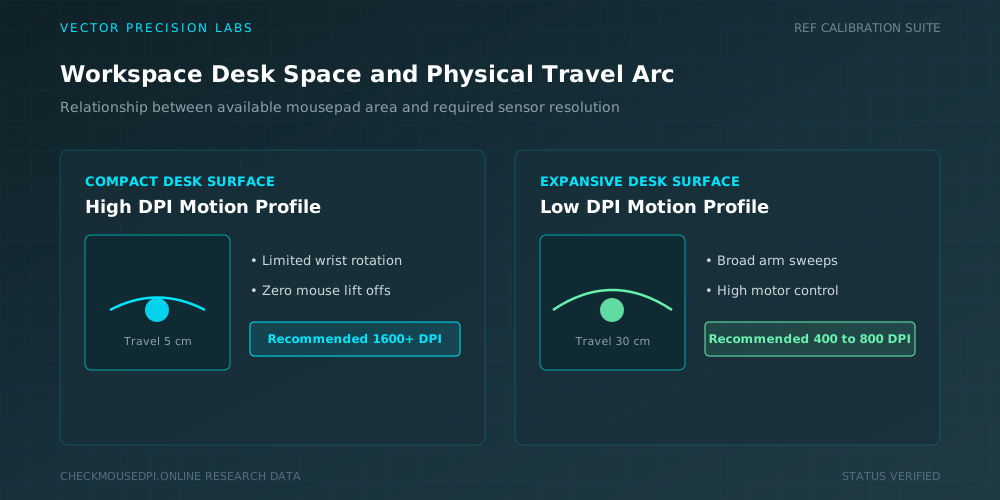
Your available desk space can make a noticeable difference. If your workspace is small, you may not have enough room for large physical movements. A higher DPI can help you move the cursor across the screen without constantly lifting the mouse.
A larger desk and mousepad provide more room for broader movements. In that situation, a lower DPI may feel comfortable because you can move the mouse farther without running out of space.
Think About Your Daily Tasks
The tasks you perform most often should influence your DPI choice. General computer activities usually do not require extremely precise pointer movement, so a moderate setting can work well.
Creative tasks are different. Photo editing, graphic design, illustration, and detailed spreadsheet work may require better cursor control. A lower or moderate DPI can make it easier to select small objects, adjust details, and position the pointer accurately.
Find the Right Balance
DPI creates a balance between cursor speed and physical mouse movement. Increasing DPI allows the pointer to travel farther with a smaller hand movement. Lowering DPI makes the cursor slower but gives you more physical control.
DPI Range Quick Reference
The table below offers a general starting point for matching a DPI range to common tasks and users. These numbers are only guidelines, since comfort and control should always take priority over any fixed recommendation.
| DPI Range | Best For | Typical User |
|---|---|---|
| 400 - 800 DPI | Detailed work and precise selection | Designers, editors |
| 800 - 1600 DPI | Everyday browsing and office tasks | General users |
| 1600 - 3200 DPI | Fast cursor movement, small desks | Multi-monitor users |
| 3200+ DPI | Very high-resolution displays | Specific gaming setups |
Consider Your Monitor Setup
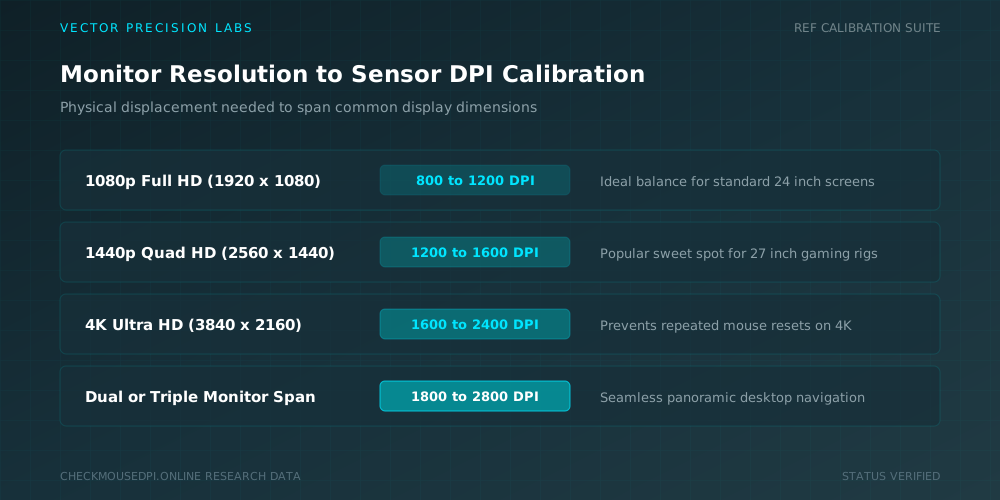
Your monitor setup can also affect how DPI feels. A large high-resolution display or multiple monitors may require more physical movement when navigating across the desktop.
A slightly higher DPI can make wide-screen navigation easier. However, monitor resolution does not automatically mean you need extremely high DPI. Comfort and control should remain more important than the monitor’s specifications.
Consider Gaming Preferences
Gaming can require a different DPI approach. Competitive games often benefit from controlled and consistent movements, while other games may feel better with faster cursor response.
Do not copy a professional player’s DPI without testing it yourself. Their mouse, sensitivity, grip, mousepad, and playing style may be different.
Test different settings during practice and choose one that allows you to aim and move comfortably without frequent corrections.
Keep Your Settings Consistent
Once you find a comfortable DPI, try to keep it consistent. Frequently changing settings can make the mouse feel unfamiliar and make precise movements harder.
If your mouse supports profiles, you can use different DPI settings for gaming, creative work, and everyday use without repeatedly changing your main configuration.
Make Gradual Changes
Avoid making large DPI changes at once. Increase or decrease the setting gradually and use the mouse normally for a while.
Browse websites, work with documents, or perform your usual tasks. If the cursor reaches its targets comfortably and small movements remain easy to control, the setting is likely suitable.
Conclusion
The best DPI for your mouse is not determined by one universal number. Mouse design, workspace size, daily activities, monitor setup, gaming preferences, and personal comfort all influence the right setting.
Start with a practical DPI and make small adjustments based on how the mouse feels. Do not choose extremely high DPI simply because your mouse supports it.
A good DPI setting should make your cursor feel controlled, responsive, and natural. When it matches your workspace and habits, you can use your mouse more comfortably and efficiently.
Dr. Marcus Vance (Hardware Lab)
Researches human-computer interaction, optical sensor telemetry, and esports hardware performance at Vector Precision Labs.